How Obacht connects your device
Your device never accepts a connection from the internet. It opens a few outbound connections itself, and everything else, from visitors to your own changes in the dashboard, travels back through those. Nothing changes on your router.
Two connections your device keeps open
When the agent (the small Obacht program on your device) starts, it opens two long-lived connections and keeps them alive:
- The Obacht network. An encrypted tunnel (WireGuard) from your device to Obacht's gateway. The device gets a fixed private address inside this network, in the range
10.137.0.0/16, that stays the same even when your home's public address changes. Public visitors reach your apps through this tunnel. - A control channel to the API. A WebSocket (a web connection that stays open in both directions) to
api.eu.obacht.dev. Status, telemetry and your signed changes go over this channel. See Signed changes and trust.
Both are started by the device. Your router sees ordinary outgoing traffic, the same kind a laptop produces when it loads a web page, so NAT and CGNAT do not get in the way. Why that matters is explained on Networking foundations.
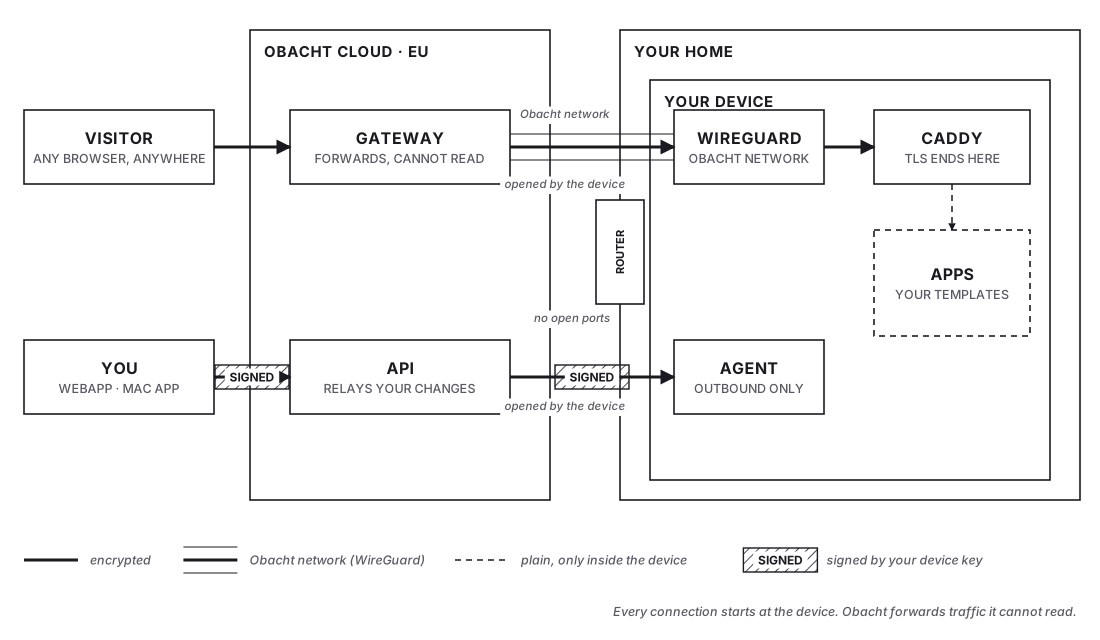
How a visitor reaches your app
- The visitor opens your web address, for example
photos.you.obacht.space. - DNS points that name at Obacht's gateway, so the request arrives there.
- The gateway looks up which device the address belongs to and passes the encrypted connection through the Obacht network to that device.
- On the device, a small web server called Caddy accepts the connection, decrypts it with the certificate it holds, and hands the request to the right app.
- The answer travels back the same way.
The gateway behaves like a router that passes packets along. Your app does not run there and your data is not stored there.
What the device needs to reach
The device needs to be able to open these outbound connections. A normal home router allows all of them without any setting. If you are on a network with a strict firewall, this is the list to allow.
| Destination | Protocol | Used for |
|---|---|---|
api.eu.obacht.dev | HTTPS and WebSocket (WSS) | Control channel, telemetry, signed changes |
registry.eu.obacht.dev | HTTPS | Fetching app manifests |
| Obacht network endpoint | UDP, port 51820 by default | The WireGuard tunnel |
github.com and its release CDN | HTTPS | Agent downloads and self-update |
get.docker.com, your distribution's apt mirrors | HTTPS | Installing Docker and system updates |
| Docker Hub, GHCR | HTTPS | Pulling app images |
No inbound port is opened anywhere, and the setup never asks you to touch port forwarding.
A router that rewrites DNS answers or blocks UDP on port 51820 keeps the tunnel from coming up. The device then shows as offline even though it has internet. See Device shows offline.
What Obacht sees, and what it does not
The TLS certificate for your web address is requested and stored by Caddy on your device, not on the gateway. The encrypted connection runs from the visitor's browser all the way to your device. Obacht carries the packets but cannot open them.
What Obacht's servers do see:
- Which device holds which web address, and whether it is online.
- How much traffic passes through the gateway for your account (the Mac app shows this as "Traffic this month").
- Device metadata and telemetry the agent reports: CPU, memory, disk, temperature, local and public IP, agent version, last seen.
- Events, such as installs and terminal sessions.
What Obacht cannot see:
- The content of requests and responses between visitors and your apps.
- Your app data. It stays on the device, see Where your data lives.
- Your device key. It is made in your browser and never uploaded in usable form, see Your device key.
Ports on the device itself
Caddy listens on the device so the tunnel has somewhere to deliver traffic.
| Device | Caddy listens on |
|---|---|
| Raspberry Pi, Linux PC | ports 80 and 443 |
| Mac | ports 8080 and 8443 inside the hosting engine |
Your apps run behind Caddy and are normally not reachable from your home network by their web address. On the Mac, the hosting engine (a small Linux VM) sees only its own data folder and has no access to your home network or other computers, only outbound internet and the Obacht network.
Next: Signed changes and trust.