Point an address at a port
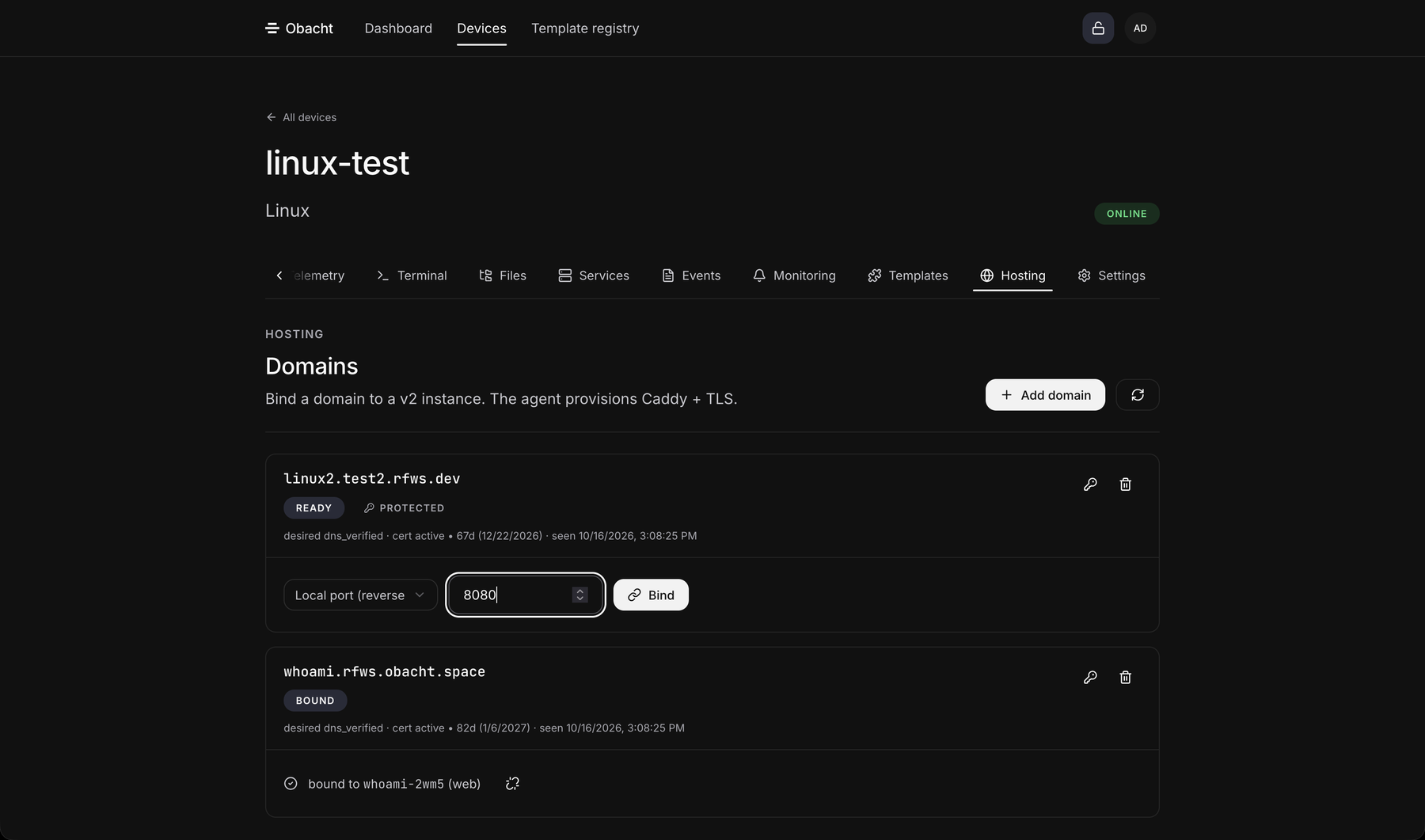
An address does not have to end at an installed app. You can point it at a port on the device, for example a program you started yourself. The device then forwards visitors from the address to that port, with the certificate handled the same way as for apps.
Pi and Linux
- Make sure the address is on the device. Add it as described in Point one domain at a device if it is not.
- Open the device, in easy mode Open advanced view, then the Hosting tab.
- In the row of the address, switch the bind control from an app to a port and type the port number ("port (e.g. 8080)", 1 to 65535).
- Confirm and unlock your device key when asked.
The program has to listen on that port on the device itself. How to start something of your own is in Run your own software.
Mac
On a Mac the apps run inside a virtual machine, but a port binding is meant for things running on the Mac itself, for example a development server on 127.0.0.1:3000. Bind the address to that port in the Hosting tab the same way; the Mac app shows "None bound. You can point an address at a local port in the dashboard." until you do.
Undo
Switch the bind control back to an app, or remove the address. The port itself stays open only on the device, nothing is exposed to the internet except through the address.
Next: Remove an address.